



Core React Concepts
1. Understanding Props in React
1. Understanding Props in React
In React,
props (short for properties) are used to pass data from a parent component to a child component.React automatically provides a props object to every functional component. This object contains all the values passed as attributes when the component is used.👇 Example:
The parent component (App) passes a prop to the child (User) like this:2. useState Hook & Destructuring Convention
2. useState Hook & Destructuring Convention
The
It always returns an array with two elements: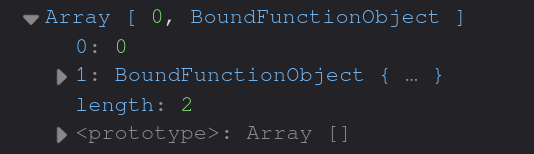 Destructuring Convention:We generally destructure using the naming pattern:
useState hook in React is used to manage local component state.It always returns an array with two elements:
- The current state value
- A function to update the state
🧠 Example:
3. useEffect Hook
3. useEffect Hook
The Example 1: Run only on first renderExample 2: Run when a value changesExample 3: Cleanup function
useEffect hook lets you run side effects in your React components — like fetching data, updating the DOM, or setting up subscriptions.It runs after the component renders, and can be configured to run:- After every render
- Only once on mount
- Or when specific dependencies change
🔧 Basic Syntax:
4. useContext Hook & Global State Sharing
4. useContext Hook & Global State Sharing
The Example:When to Use:
useContext hook lets you share state or values globally across components — without manually passing props at every level (aka “prop drilling”).It’s perfect for things like:- Theme or language settings
- Auth/user data
- Global app config or state
🧠 Basic Setup:
- You want to avoid prop drilling
- You need shared state/data accessible across many components
- You’re building global providers (theme, user, etc.)
5. useReducer Hook & State Management
5. useReducer Hook & State Management
The ➤ useReducer makes your state transitions more predictable, testable, and scalable in larger components.
useReducer hook is an alternative to useState for managing more complex state logic — especially when:- The next state depends on the previous state
- You want to group related state updates together
- You’re building Redux-style reducer logic
🧠 Basic Syntax:
- state → current state value
- dispatch → function to trigger state changes
- reducerFn → (state, action) => newState
6. useRef Hook & DOM References
6. useRef Hook & DOM References
The Storing mutable values (like instance variables):When to Use:
useRef hook in React is used to access DOM elements directly or to store mutable values that don’t trigger re-renders.It returns a ref object with a .current property that you can update or read.🧠 Syntax:
- To directly manipulate DOM elements (like .focus(), .scrollIntoView())
- To persist data across renders without re-rendering the component
- To store previous values or timeout/interval IDs
7. Suspense in React
7. Suspense in React
React Suspense is a feature that lets you wait (“suspend”) rendering of a component until some async operation is done, like data fetching or lazy-loading.Old Way:With Suspense:
8. use API in React
8. use API in React
use() lets you directly await promises inside a component — especially useful for:With use:
- Async components (like await import() / fetch)
- Server components (React Server Components)
- Data fetching during rendering